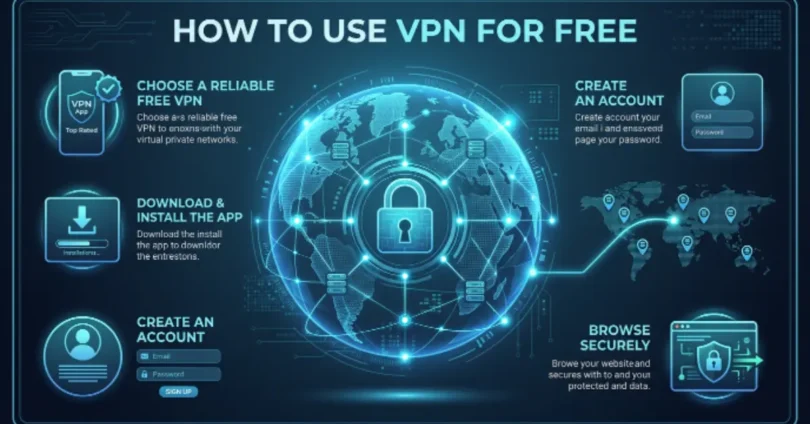
Using the internet safely is very important, and a VPN can help with that. In this guide, you will learn how to use VPN for free step by step. A VPN hides your online activity and keeps your data private.
Many people think VPNs are expensive, but you can protect yourself without paying a single penny. This article will show you easy ways on how to use VPN for free, whether on your phone or computer.
What is a VPN and Why Do You Need It?
A VPN is a simple tool that helps you stay safe and private on the internet. Let’s understand it in an easy way.
What VPN Means in Simple Words
- VPN stands for Virtual Private Network
- It creates a safe tunnel for your internet connection
- It hides your real IP address
- It makes your online activity private
👉 In simple words, a VPN keeps your internet use hidden from others.
Why People Use VPN in Daily Life
- It protects personal data from hackers
- It helps you browse safely on public Wi-Fi
- It allows access to blocked websites
- It keeps your location private
👉 People use VPN to stay safe, private, and free online.
Real-Life Example: Using Public Wi-Fi Safely
- You connect to Wi-Fi in a café or airport
- Hackers can try to steal your data on open networks
- A VPN protects your login details and messages
- It keeps your internet activity safe and hidden
👉 For example, if you check your bank account on public Wi-Fi, a VPN helps protect your password from being stolen.
Is It Safe to Use a Free VPN?
Free VPNs can be safe in some cases, but not all of them are trustworthy. It depends on the app or service you choose. Some free VPNs protect your privacy well, while others may collect your data.
Basic Safety Explanation
- Some free VPNs offer basic protection for browsing
- Trusted apps usually follow privacy rules
- Untrusted VPNs may track your activity
- Safety depends on the provider you choose
👉 Simple idea: A free VPN is safe only if it comes from a trusted source.
Pros of Free VPN
- No money needed to start using it
- Easy to download and set up
- Good for basic browsing protection
- Helps you access some blocked sites
👉 Free VPNs are useful for light and normal internet use.
Risks of Free VPN
- Some apps may collect your personal data
- Slower internet speed compared to paid VPNs
- Limited servers and features
- Possible ads or hidden tracking
👉 Free VPNs can be risky if you don’t check the provider carefully.
Simple Tip to Stay Safe
- Always download VPN from official stores
- Read user reviews before installing
- Avoid unknown or suspicious apps
- Never use VPN for sensitive work like banking if unsure
👉 Best rule: Use only trusted VPN apps to stay safe online.
How to Use VPN for Free on Mobile
Using a VPN on your phone is simple and takes just a few minutes. Here’s a clear guide to help you get started.
Step-by-Step Setup Guide
- Open your phone’s app store (Google Play or App Store)
- Search for a trusted free VPN app
- Download and install the app
- Follow the app instructions to set it up
👉 Setting up a VPN on mobile is quick and easy with the right app.
Downloading a Free VPN App
- Choose a VPN with good ratings and reviews
- Check if it’s really free and safe
- Tap “Install” to download the app
- Wait for the installation to finish
👉 Only download VPN apps from official app stores to stay safe.
Creating an Account (If Needed)
- Some free VPNs ask you to create an account
- Enter your email and a secure password
- Verify your account if required
- Some apps work without signing up
👉 Creating an account helps some apps save your preferences and servers.
Turning VPN On/Off
- Open the VPN app on your phone
- Tap the “Connect” button to start the VPN
- Choose a server location if needed
- Tap “Disconnect” when you want to turn it off
👉 Turning VPN on/off is simple and lets you control when your connection is protected.
How to Use VPN for Free on PC or Laptop
Using a VPN on a computer is also simple. You can install an app or use a browser-based VPN for quick access.
Easy Installation Steps
- Open your browser and go to a trusted VPN website
- Download the free VPN software for your PC or laptop
- Install the software by following simple on-screen steps
- Open the app after installation is complete
👉 Installing a VPN on PC is just like installing any other software.
Browser-Based VPN Options
- Some VPNs work directly in browsers like Chrome or Firefox
- Install a VPN extension from the browser store
- Click “Add to browser” to activate it
- Turn it on when you want to browse safely
👉 Browser VPNs are fast and do not need full installation.
Connecting to a Server
- Open your VPN app or browser extension
- Click on the “Connect” button
- Select a server location if asked (like US or UK)
- Wait for the connection to turn active
👉 Once connected, your internet becomes private and secure.
Best Free VPN Features to Look For
Not all free VPNs are the same. A good VPN should protect you, work smoothly, and be easy to use. Here are the key features you should always check.
Strong Privacy Protection
- VPN should hide your real IP address
- It should encrypt your internet data
- It protects you from hackers and trackers
- It keeps your online activity private
👉 A strong privacy feature means your data stays safe from outside access.
Fast Connection Speed
- VPN should not slow down your internet too much
- It should load websites quickly
- Good servers help improve speed
- Smooth video streaming is a plus
👉 A fast VPN helps you browse without delays or buffering.
No-Log Policy
- VPN should not save your browsing history
- It should not track what you do online
- Trusted VPNs clearly mention “no logs”
- It improves your privacy and safety
👉 A no-log VPN means your online activity is not recorded anywhere.
Easy Interface
- App should be simple to use
- One-click connect option is helpful
- Easy server selection menu
- Clear buttons and settings
👉 A simple design makes VPN easy even for beginners.
Common Mistakes to Avoid When Using Free VPN
Many people make small mistakes when using free VPNs. These mistakes can reduce safety and performance.
Using Unsafe Apps
- Downloading VPN from unknown websites
- Using apps with no clear developer info
- Installing apps with too many ads or pop-ups
- Risk of data theft increases
👉 Always use trusted VPN apps from official stores.
Ignoring Permissions
- Allowing unnecessary access to your phone
- Giving permission without reading details
- Some apps may ask for sensitive access
- This can affect your privacy
👉 Always check what permissions a VPN app is asking for.
Not Checking Reviews
- Skipping user feedback before installing
- Ignoring low ratings and complaints
- Missing warning signs about fake apps
- Risk of poor performance or scams
👉 Reviews help you choose a safe and reliable VPN.
Benefits of Using a Free VPN
Free VPNs offer several useful advantages for daily internet use.
Online Privacy
- Hides your real IP address
- Keeps browsing activity private
- Protects identity online
- Reduces tracking by websites
👉 VPN helps you stay anonymous while surfing the internet.
Access Blocked Websites
- Opens restricted websites easily
- Helps access global content
- Works for some apps and platforms
- Removes location limits
👉 VPN lets you explore more content without restrictions.
Safe Browsing on Public Wi-Fi
- Protects data on café or airport Wi-Fi
- Stops hackers from stealing information
- Encrypts your internet connection
- Keeps login details safe
👉 Public Wi-Fi becomes safer with a VPN.
Limitations of Free VPNs
Free VPNs are helpful but have some limits you should know.
Data Limits
- Some VPNs offer limited daily data
- Usage may stop after limit ends
- Not good for heavy streaming
- Restricts long browsing sessions
👉 Free VPNs are best for light internet use.
Slower Speed
- Internet speed may drop
- Servers can get crowded
- Videos may buffer more often
- Downloads may take longer
👉 Paid VPNs usually offer better speed.
Fewer Server Options
- Limited country choices
- Fewer location switches available
- May not unblock all sites
- Less flexibility overall
👉 Fewer servers mean fewer connection options.
Tips to Get the Best Experience with Free VPN
Follow these simple tips to improve your VPN use.
Choose Trusted Apps
- Download from official app stores
- Check ratings before installing
- Use well-known VPN providers
- Avoid unknown apps
👉 Trusted apps give better safety and performance.
Connect to Nearby Servers
- Choose servers close to your location
- Improves browsing speed
- Reduces lag and delay
- Better for streaming and browsing
👉 Nearby servers give a smoother internet experience.
Avoid Sensitive Transactions
- Do not use VPN for banking if unsure
- Avoid entering personal card details
- Stick to general browsing only
- Use trusted networks for payments
👉 Be extra careful with important online activities.
Conclusion
Using a VPN is a simple way to stay safe and private online. It helps protect your data, hides your identity, and lets you browse more freely.
Free VPNs are useful for basic use, but you should always choose a trusted app and use it carefully. Some have limits, so they work best for normal browsing, not heavy tasks.
Now you know how to use VPN for free in an easy way. Try it safely and enjoy a more secure internet experience.