If you are new to artificial intelligence, learning how to use AI tools for beginners can feel overwhelming. But don’t worry this guide will make it simple and easy to understand.
AI tools can help you save time, improve your work, and make everyday tasks easier. In this article, you will learn how to use AI tools for beginners step by step, with tips and examples that anyone can follow.
What Are AI Tools?
AI tools are software programs that use artificial intelligence to help people complete tasks faster and more easily. These tools can create content, answer questions, design images, analyze data, and much more.
Simple Explanation of AI Tools
AI tools are designed to understand information and provide useful results.
- AI tools work like smart assistants that help users complete tasks.
- They can understand text, images, voice, and other types of information.
- Many AI tools are easy to use and do not require technical skills.
- For example, ChatGPT can help you write emails, articles, and answers in seconds.
How AI Tools Work
AI tools learn from large amounts of data and use that knowledge to provide responses.
- They analyze the information you provide and generate useful results.
- AI tools follow instructions called prompts to complete tasks.
- The better your prompt is, the better the result will be.
- For example, if you ask an AI tool to write a blog introduction, it can create one within a few seconds.
Common Uses of AI Tools
AI tools can help with many personal, educational, and professional tasks.
- Create blog posts, emails, and social media content.
- Help students with research, notes, and learning materials.
- Design images, presentations, and graphics quickly.
- Organize tasks, answer questions, and improve productivity.
Benefits of Using AI Tools for Beginners
AI tools offer many advantages for people who are just getting started with technology.
Save Time
AI tools can complete tasks much faster than doing them manually.
- Generate content within seconds.
- Find information quickly without searching multiple websites.
- Automate repetitive tasks and reduce workload.
- Spend more time on important activities.
Improve Productivity
AI tools help users work more efficiently and stay organized.
- Complete tasks faster and with less effort.
- Manage projects and daily work more effectively.
- Create high-quality content in less time.
- Focus on important decisions instead of routine work.
Learn New Skills Faster
AI tools make learning easier by providing instant guidance and support.
- Get explanations for difficult topics in simple language.
- Learn writing, coding, design, and other skills more quickly.
- Access helpful examples and step-by-step instructions.
- Practice new skills with AI-powered assistance.
Help With Daily Tasks
AI tools can simplify many everyday activities.
- Write emails, messages, and reports quickly.
- Create shopping lists, schedules, and reminders.
- Translate text into different languages.
- Get answers to common questions anytime.
Popular AI Tools for Beginners
There are many AI tools that beginners can start using easily. These tools help with writing, designing, productivity, and learning.
ChatGPT
- ChatGPT can write articles, emails, and answers quickly.
- It can generate ideas for projects or creative writing.
- Beginners can use it without technical skills.
- It provides explanations in simple language.
Google Gemini
- Google Gemini can answer questions and help with research.
- It can summarize long documents for easy reading.
- Helps beginners explore AI without complex setups.
- Works well for learning and daily tasks.
Canva AI
- Canva AI helps design images, posters, and social media content.
- Offers templates that are easy for beginners to use.
- Saves time in creating graphics.
- Allows customization with simple drag-and-drop tools.
Grammarly
- Grammarly checks grammar, spelling, and writing style.
- Helps beginners write error-free emails, articles, and reports.
- Suggests better word choices and sentence structure.
- Improves overall writing skills gradually.
Microsoft Copilot
- Microsoft Copilot works in Microsoft Office apps like Word and Excel.
- Helps automate tasks and create documents quickly.
- Guides beginners to use AI features in daily work.
- Makes complex work faster and easier.
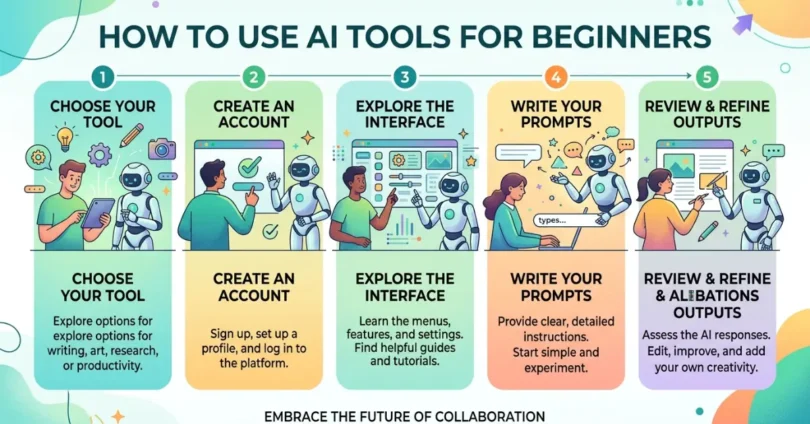
How to Use AI Tools for Beginners: Step-by-Step Guide
Learning how to use AI tools for beginners is easier when you follow simple steps.
Step 1: Choose the Right AI Tool
- Pick a tool that matches your goal.
- Start with one or two tools to avoid confusion.
- Check if the tool is beginner-friendly and free or affordable.
- Example: Use ChatGPT for writing and Canva AI for design.
Step 2: Create an Account
- Sign up using email or social media accounts.
- Follow the instructions for verification.
- Explore the dashboard to understand features.
- Keep your login details safe.
Step 3: Learn Basic Features
- Start with simple functions like writing, summarizing, or designing.
- Watch beginner tutorials if available.
- Test each feature to see how it works.
- Focus on one feature at a time.
Step 4: Write Clear Prompts
- Be specific about what you want the AI to do.
- Use short and simple sentences.
- Give context for better results.
- Example: Instead of “Write an article,” say “Write a 300-word article on healthy breakfast tips.”
Step 5: Review and Improve Results
- Check AI output for accuracy and clarity.
- Make edits and ask AI for improvements.
- Learn from corrections to improve prompts.
- Practice regularly to get better results.
Best Ways to Use AI Tools in Daily Life
AI tools can simplify both work and personal tasks.
- Writing and content creation: Create blogs, social media posts, and emails quickly.
- Studying and learning: Summarize notes, get explanations, and find examples.
- Work and business tasks: Automate reports, presentations, and research.
- Design and creativity: Make images, posters, and visuals without complex software.
Common Mistakes Beginners Should Avoid
Avoid these mistakes to get the best results from AI tools.
- Using unclear prompts: Vague instructions lead to poor output.
- Trusting AI without checking facts: Always verify information.
- Using too many tools at once: Focus on one tool at a time to learn better.
- Ignoring privacy and security: Protect personal data and login details.
Tips to Get Better Results from AI Tools
Follow these tips to use AI tools effectively.
- Be specific in your prompts: Clear instructions get accurate results.
- Give context: Help AI understand what you want.
- Experiment with different instructions: Try multiple approaches for better results.
- Practice regularly: The more you use AI, the easier it becomes.
Are AI Tools Safe for Beginners?
AI tools are generally safe, but beginners should follow basic safety steps.
- Basic privacy tips: Avoid sharing sensitive personal information.
- Safe usage practices: Use trusted and verified AI tools only.
- Things to avoid: Do not rely fully on AI for important decisions, and always double-check facts.
Conclusion
Learning how to use AI tools for beginners is easier than it seems. Start with one simple tool, follow the steps, and practice regularly. AI tools can save time, improve your work, and help you learn new skills. Begin today and explore the possibilities!